WealthFlow
Hoxton Wealth · Client app · PRODUCT DESIGN
Wealthflow
Redesigning retirement planning so clients can explore different futures and advisors can turn those explorations into meaningful conversations.

4,500+
scenarios created in two quarters
+50%
monthly active users
90%+
relationship manager adoption
+40%
net new assets, engaged cohort
Commercial outcomes measured within engaged accounts, not attributed solely to the scenario feature. +25% annualised advisory-fee revenue on accounts using the tool.
Role
Product Designer · led design
Company
Wealth management firm
SCOPE
Client app
Timeline
Dec 2023 → Mar 2024
Context
At a global wealth management firm, I worked as a Product Designer on Scenario Planner, a retirement planning tool within our client experience. Clients use it to explore how their financial decisions could affect their future, while relationship managers use those projections to support conversations about retirement goals and financial planning.
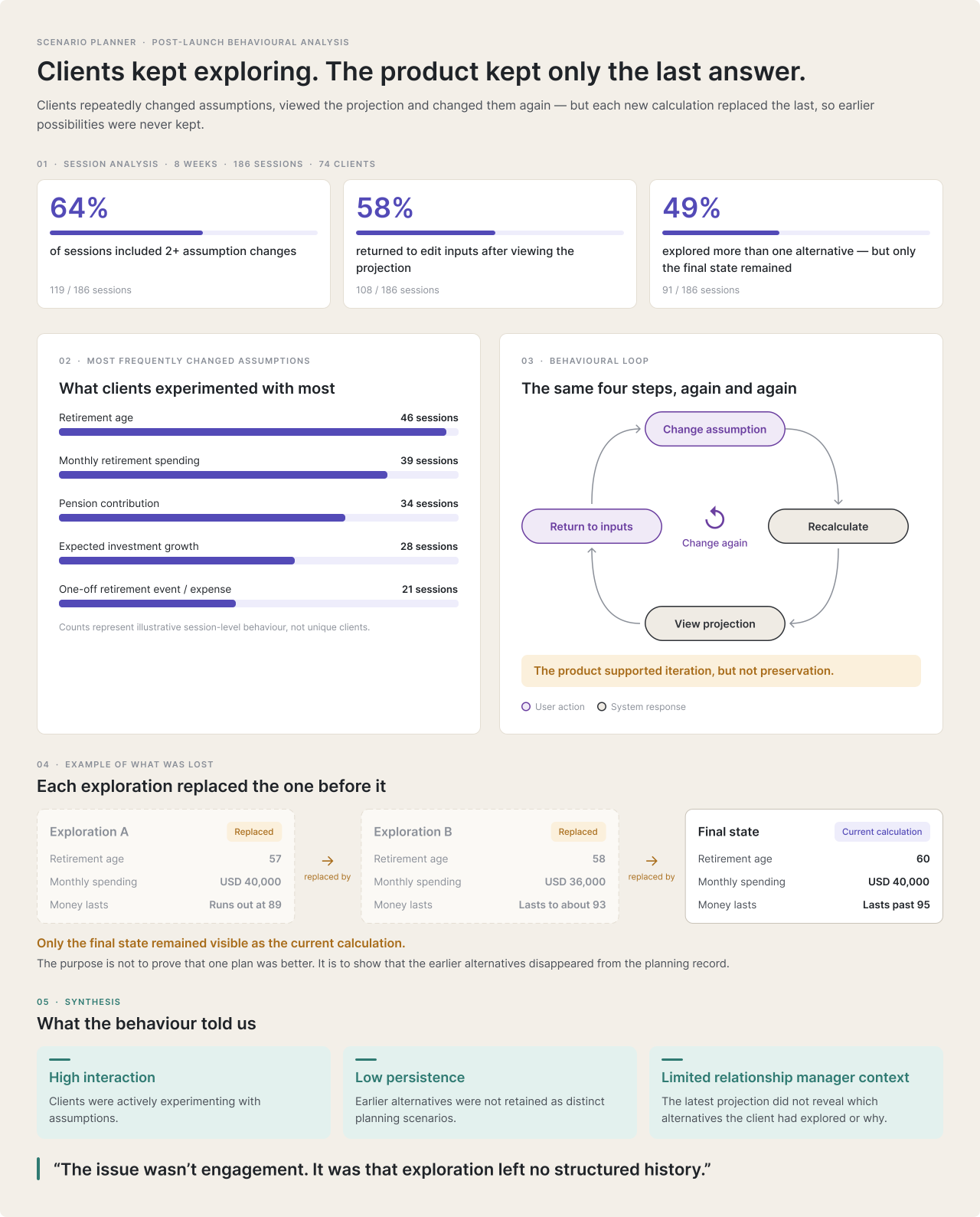
Scenario Planner was gaining traction, and its engagement figures initially suggested that clients were finding value in the experience. But when we looked more closely at how people were using it, a different picture emerged. Clients were repeatedly changing their assumptions to explore alternative futures, often replacing their previous calculations. Relationship managers could see that clients were active, but couldn’t reliably understand what they had explored or which possibilities mattered to them.
What began as an investigation into a successful feature became a redesign of how clients and relationship managers explore, preserve and discuss retirement scenarios.


Problem
Retirement planning involves understanding how decisions made today may affect a client’s financial future. Clients need the freedom to explore possibilities, while advisors need enough context to distinguish an exploratory idea from an agreed financial plan. A calculator can generate projections, but its business value depends on whether those projections lead to productive conversations and better-informed planning decisions.
Following WealthFlow’s initial launch, behavioural analytics showed repeated changes to retirement assumptions. Clients could adjust an input, view the resulting projection and then change it again to test another possibility. The experience provided limited structure for preserving those alternatives or understanding how they related to one another. A client’s latest projection therefore did not necessarily explain what they had explored or what they wanted to discuss with their advisor.
The problem wasn’t a lack of engagement. It was that exploration wasn’t producing a clear, reusable planning record.
Key limitations included:
Unstructured exploration
Clients could test many possibilities without a clear way to preserve and identify the ones worth revisiting.
Limited advisor visibility
Advisors needed to understand what clients had explored without reconstructing every calculation during a meeting.
Unclear planning context
An exploratory projection could be mistaken for the client’s existing or preferred financial plan.
Complex financial relationships
Changes to retirement age, contributions, spending and life events could influence several parts of a projection.
Suitability considerations
Exploring a possible future should not imply that it represents an approved financial recommendation.
Solution
The initial instinct was to improve how scenarios were displayed and compared. But clearer visualisation alone wouldn’t solve the underlying problem: clients needed a way to preserve their explorations, and advisors needed access to the context behind them.
I redesigned the scenario experience around saved, identifiable planning objects that clients could revisit and advisors could use as a shared reference. Rather than making every adjustment another temporary calculation, WealthFlow could support a more continuous journey from exploration to discussion.
What shaped the scenario experience?
Understand why clients kept changing their plans
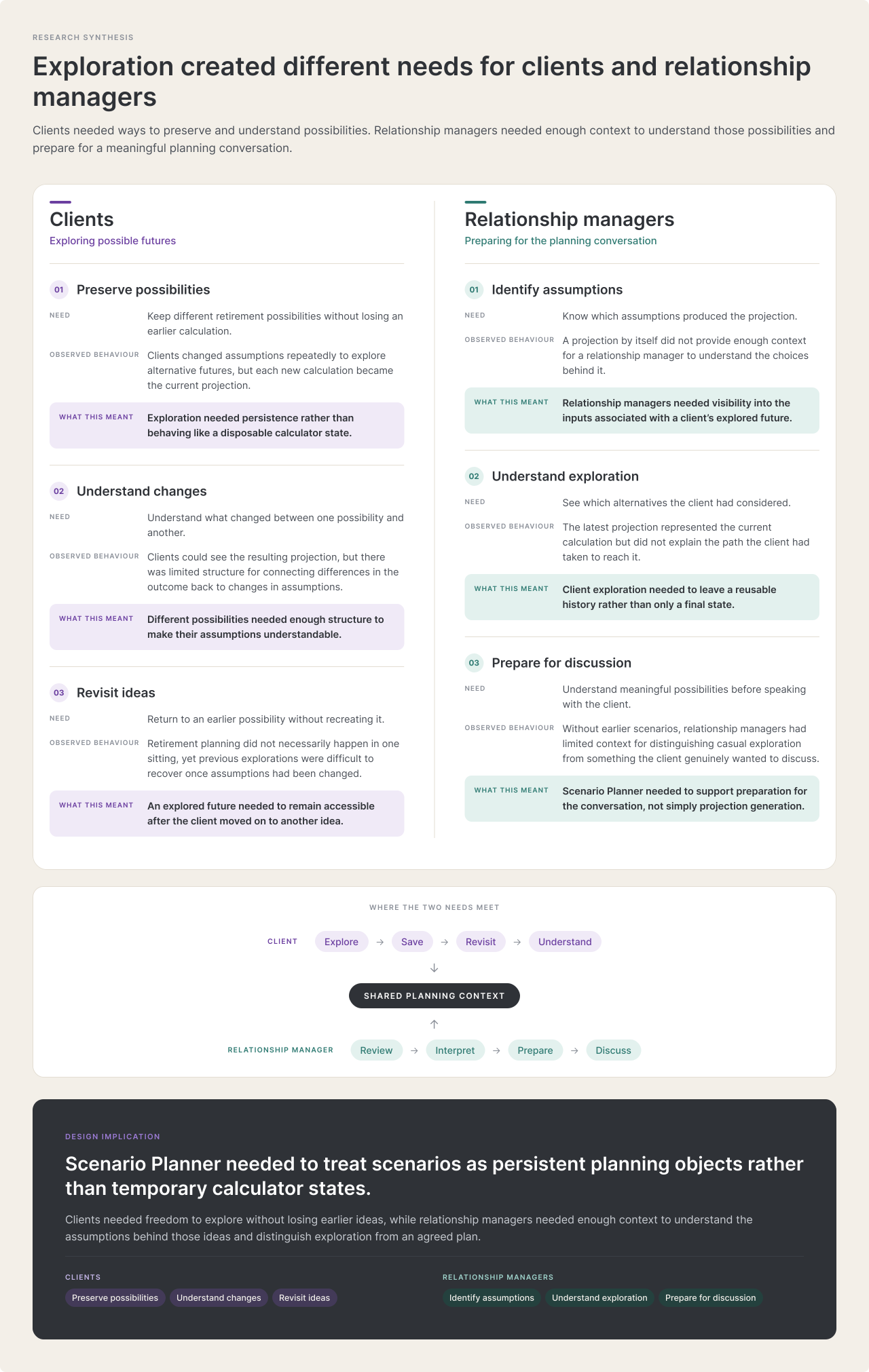
The analytics showed what clients were doing, but not why. Reviewing the behaviour alongside client and advisor feedback exposed two connected needs.
Clients wanted to explore different retirement possibilities without losing earlier ideas. Advisors needed to understand which assumptions had changed, how different possibilities compared and what the client wanted to achieve.
Simply displaying more calculations would not address either need. The scenario itself had to become something clients could recognise, return to and discuss.
That changed the direction of the redesign from improving a calculator’s controls to supporting an ongoing planning conversation.
Make scenarios reusable rather than disposable
We considered whether clients should always create a scenario from scratch or be able to build on an existing one.
Starting from scratch offers a clean beginning, but it also requires clients to recreate assumptions they may want to keep. Duplicating an existing scenario preserves the starting context and lets them change only the variables they want to explore.
I designed the experience to support both approaches. Clients can create a new scenario when they want a different starting point or duplicate one when testing a variation of an existing idea.
The important change is that the earlier scenario remains available rather than disappearing into the next calculation.
Create, duplicate and preserve possibilities
The creation flow records a named set of inputs. Duplication keeps the original available while a related scenario is explored.

01 — Name the base scenario and set the age assumptions.

02 — Add savings and growth assumptions, then create the plan.

03 — Duplicate from the existing scenario menu.

04 — Base Scenario (2) appears alongside the original.
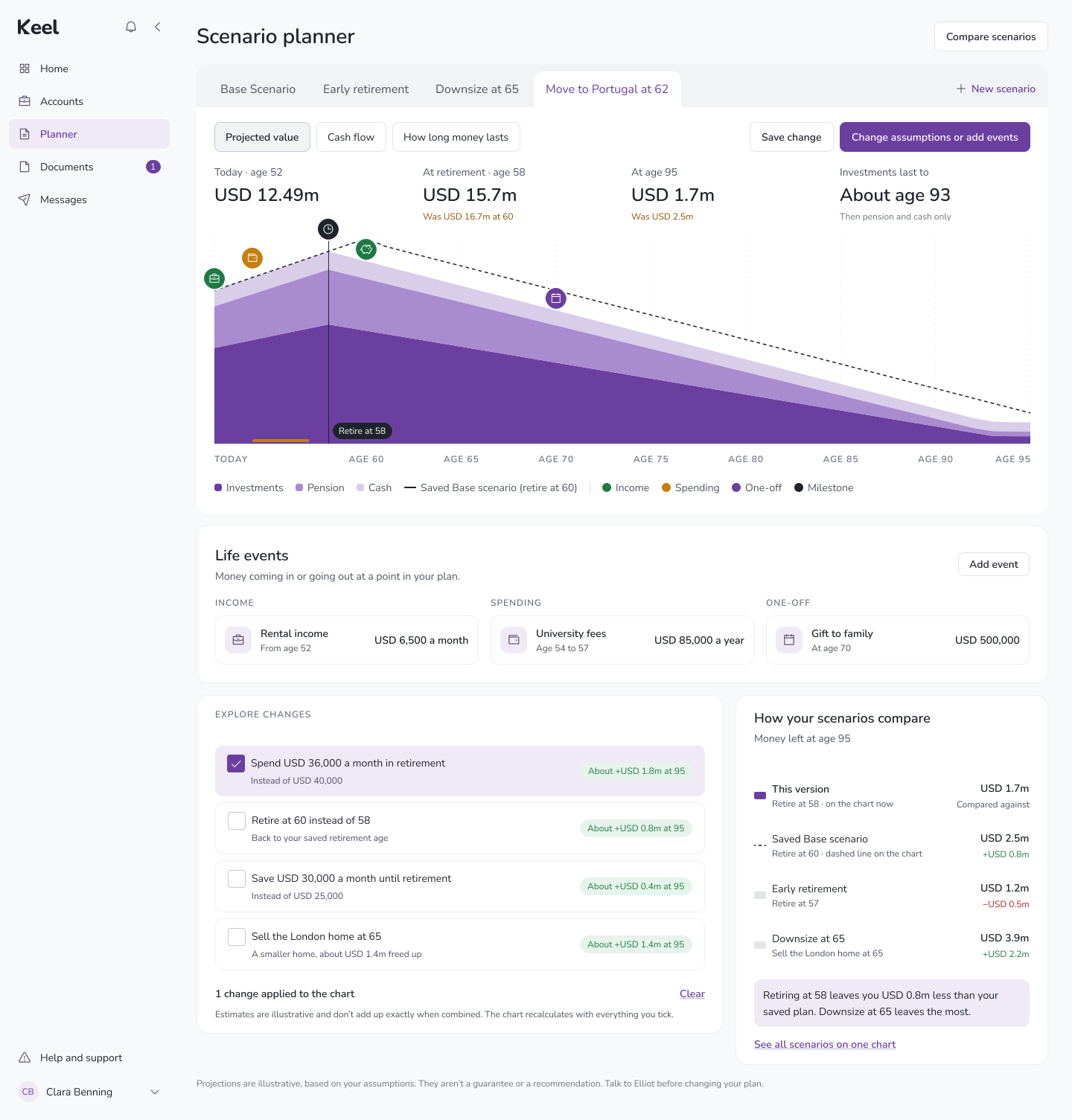
05 — Base Scenario and Early Retirement remain separately accessible.
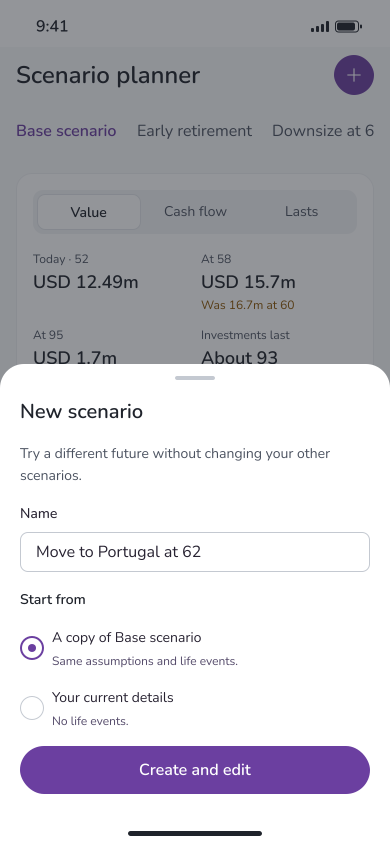
Mobile — Create new or duplicate an existing scenario.
Source fidelity: the Base Scenario and Early Retirement designs reuse the same retirement-age values. A verified difference in assumptions is not shown. Original example values and placeholders are retained.
Give exploration structure without forcing comparison
Another question was whether scenarios should remain permanently visible side by side or be organised into a focused workspace.
Permanent comparison makes differences immediately available, but it also increases visual density around an already complex financial graph. A tab-based experience lets clients focus on one possibility at a time while keeping other saved scenarios accessible.
I chose tabs as the primary navigation pattern, with comparison available as a deliberate action rather than a constant part of the screen.
This preserved the clarity of the individual retirement projection without removing the ability to examine alternatives when a client needed to make sense of them together.
From comparison concepts to focused navigation
Early concepts explored two complete scenarios side by side and a tabbed workspace with an explicit Compare Scenarios action.
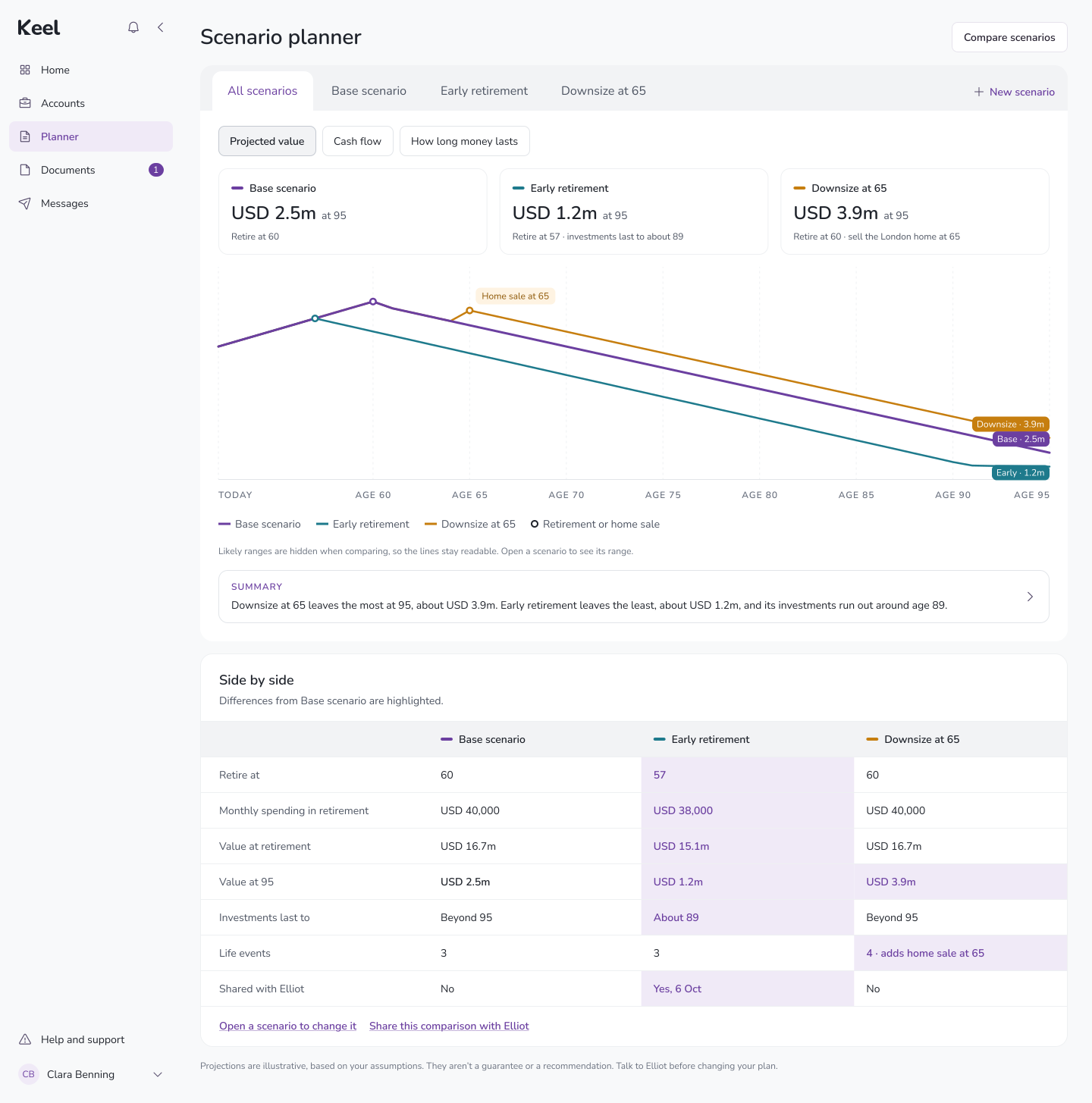
Early concept — All scenarios plotted on one chart.

Early concept — Scenario tabs with a Compare Scenarios entry point.
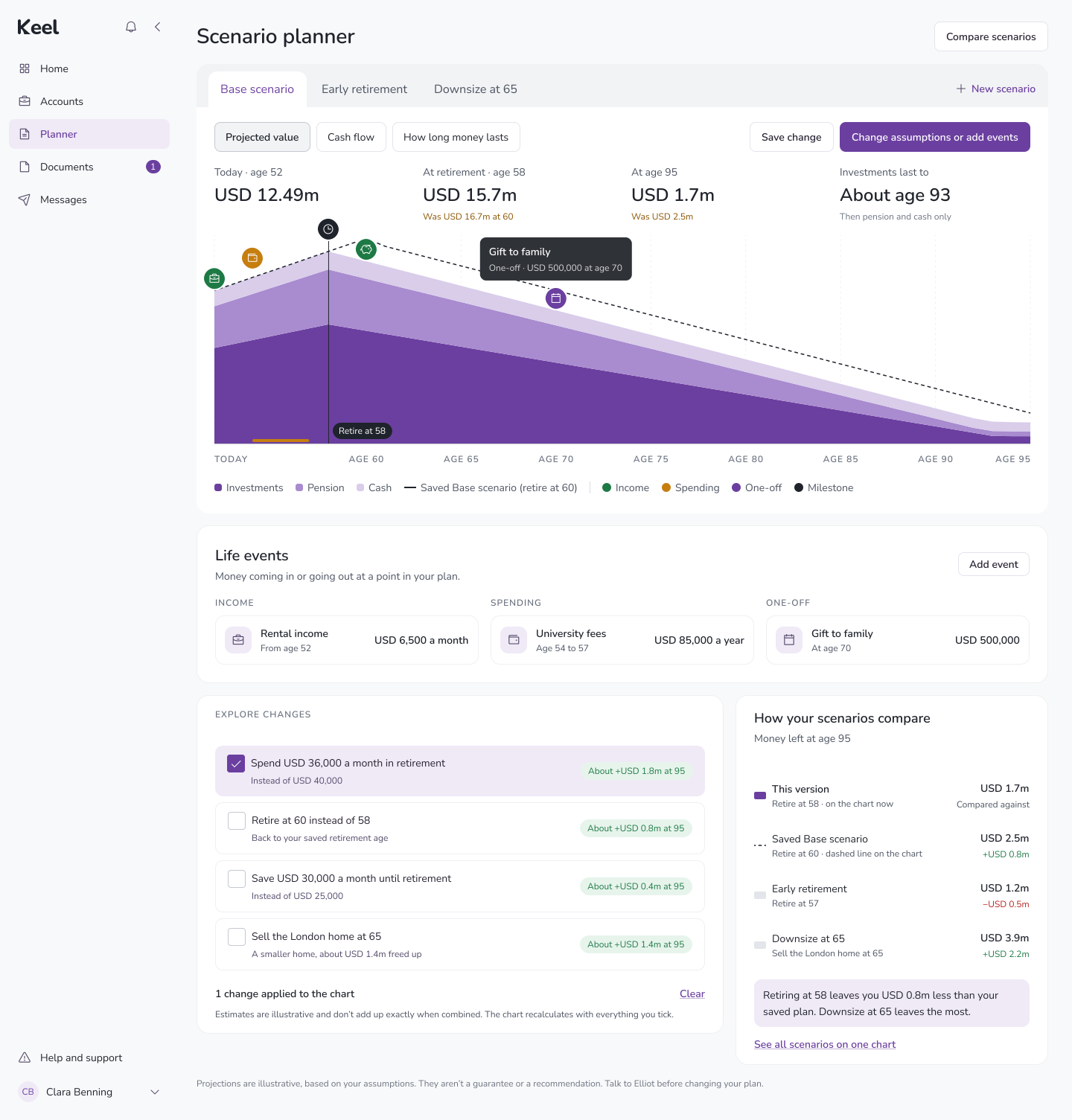
Development design — Switch between named scenario tabs.
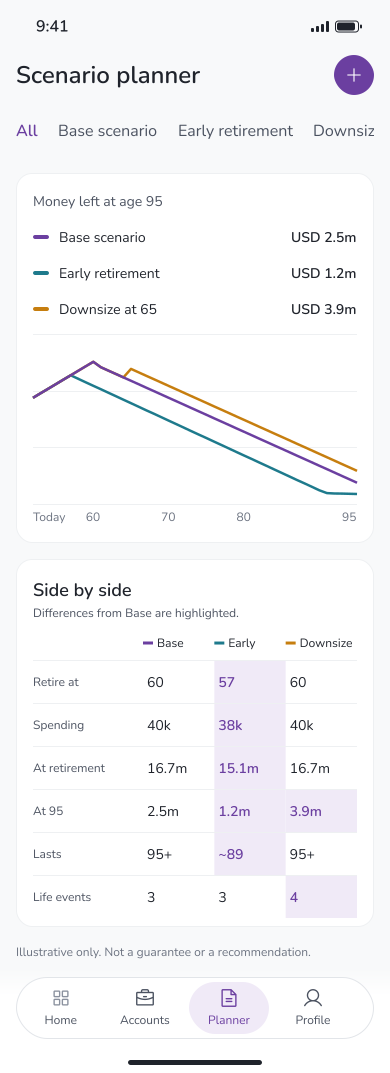
Final design — All scenarios on mobile.
Design trade-off: showing two full scenarios doubles the graph and detail panels. Tabs preserve more space for one scenario. The source feedback asks for saved scenario tabs; its analysis also calls for scenario-specific asset changes and graph-only comparison.
Keep exploration separate from an agreed plan
A saved scenario represents a possible future. It doesn’t necessarily reflect the client’s current financial plan, preferred outcome or an advisor’s recommendation.
The experience therefore needed to preserve context without forcing clients to assign an authoritative “current plan” label to every exploration. Scenarios could remain possibilities until the client and advisor were ready to discuss their relevance.
This distinction matters in financial planning. A projection may help someone understand a trade-off, but the interface should not imply that exploring it automatically makes it an agreed course of action.
What can the redesigned scenario experience do?
Four connected capabilities make retirement exploration easier to preserve, understand and discuss.
Save and revisit possibilities
Clients can name and save different retirement scenarios instead of repeatedly replacing their previous calculations. A scenario becomes recognisable through its name and associated assumptions, making it easier to return to an earlier idea.
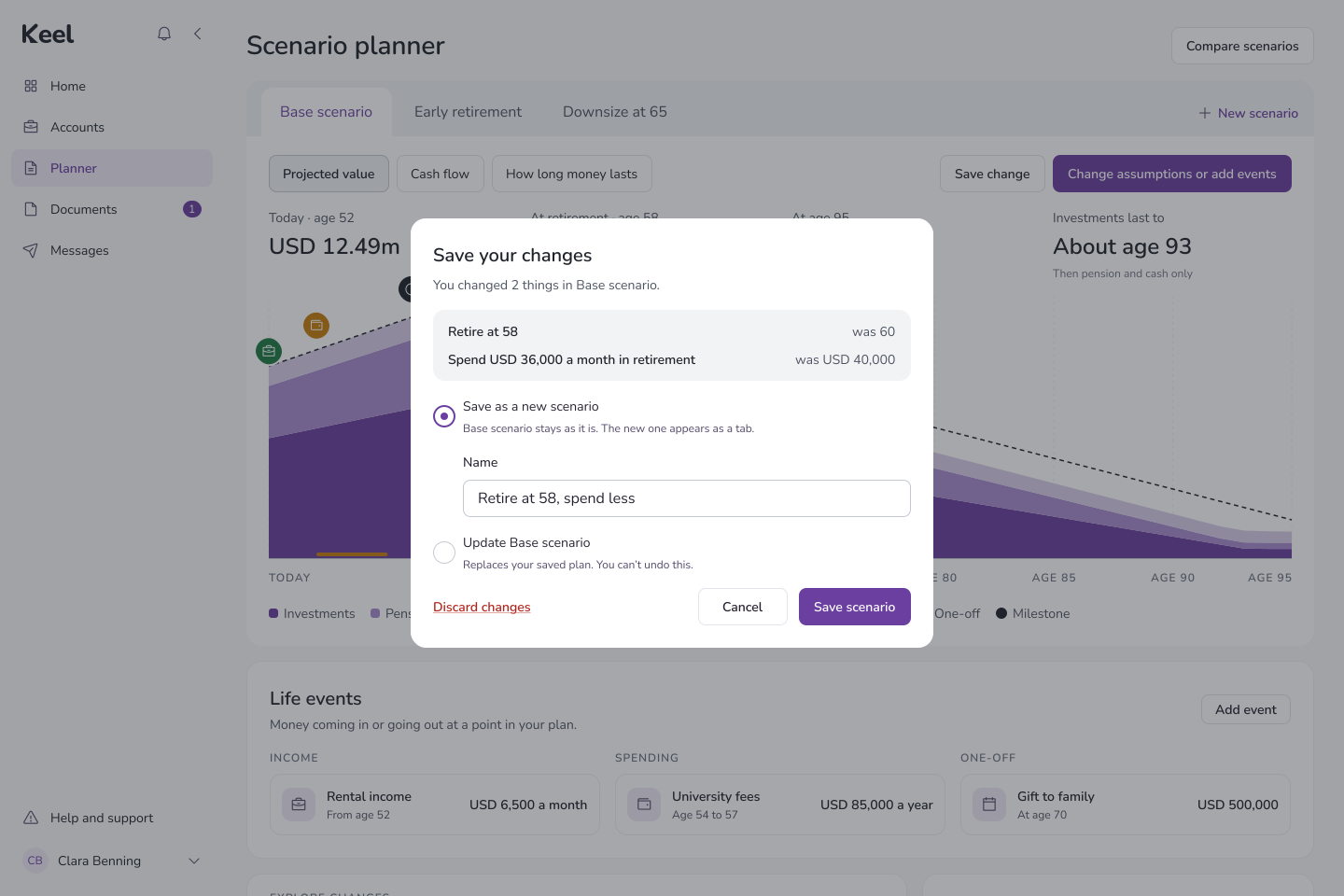

Web and mobile — An explored change can be saved as a new scenario or used to update the current one.
Compare meaningful changes
Clients can examine alternative scenarios and understand how changed assumptions affect their projected retirement outlook. Comparing scenarios becomes more useful when the differences in inputs are considered alongside the resulting projection.
The experience helps turn abstract changes such as retiring earlier or spending more into possibilities that can be discussed in context.
Web and mobile — All scenarios on one chart, with a summary and a side-by-side view of what changed.
Make relationship manager preparation easier
Relationship managers can access the saved scenarios a client has explored and use them to understand the questions behind an upcoming planning conversation. Rather than asking the client to recreate earlier calculations, they can focus on the assumptions and outcomes the client wants to discuss.
The scenario becomes a shared reference between two people who previously had different views of the client’s exploration.

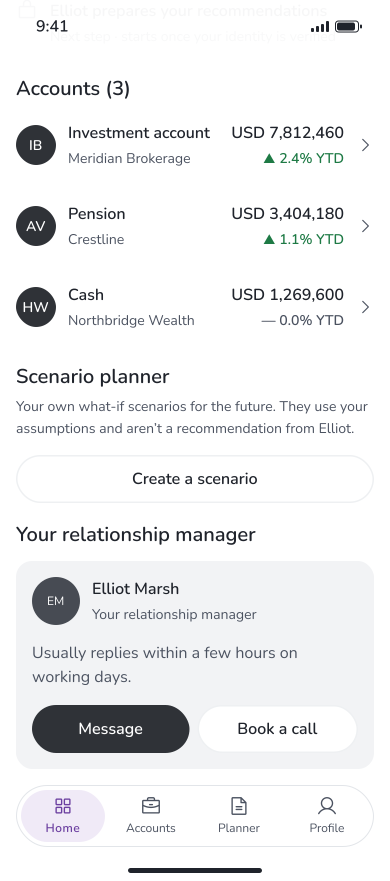
Web and mobile — Sharing a scenario with Elliot on web; on mobile, Elliot is one tap away from the scenario planner on Home.
Support continuous planning
Clients can return to saved possibilities as their circumstances or priorities change. Relationship managers can revisit those same scenarios during reviews and use them as context for further discussions.
This makes Scenario Planner more than a one-time calculation. It supports an ongoing planning relationship in which earlier exploration remains available and understandable.
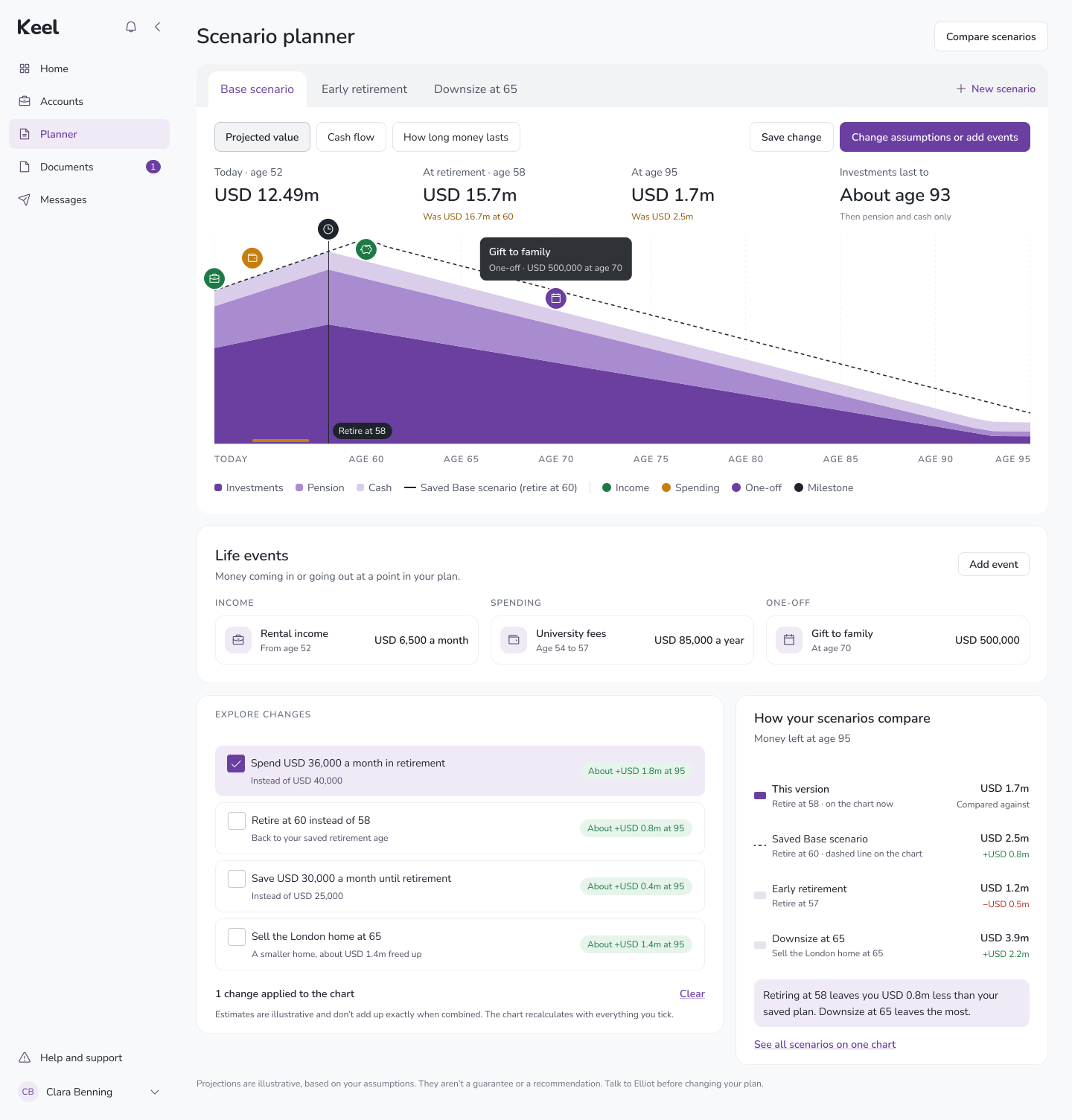

Web and mobile — Returning to a saved scenario and exploring a change without losing the original.
What changed
Scenario Planner’s reported product performance demonstrates substantial engagement with digital retirement planning. Over two quarters, clients created more than 4,500 scenarios, while the wider tool also recorded increased monthly active usage and strong relationship manager adoption.
These figures describe outcomes for the wider tool over the same period, so they aren’t attributed solely to the scenario redesign.
4,500+
scenarios created in two quarters
+50%
monthly active users
90%+
relationship manager adoption
+40%
net new assets, engaged cohort
Commercial outcomes measured within engaged accounts, not attributed solely to the scenario feature. +25% annualised fee revenue on accounts using the tool.
How I worked
With
Clients, advisors, product and engineering
I worked with clients and advisors to understand how WealthFlow was being used beyond the numbers shown in the product. Client conversations helped uncover why people repeatedly changed assumptions, while advisor feedback revealed the difficulty of understanding what a client had explored before a planning conversation. I worked with product and engineering to translate those behaviours into a scenario model that could be supported within the existing WealthFlow experience.
ARTEFACTS
Behavioural analytics, interviews and scenario modelling
I combined product analytics with qualitative research rather than relying on either source alone. Behavioural data showed repeated editing and scenario creation patterns; interviews helped explain the intent behind them. I used those findings to map how a scenario should be created, duplicated, saved, revisited and compared, and to distinguish exploratory scenarios from an agreed financial plan.
VALIDATION
Flows, concepts and iterative testing
I used AI to accelerate the synthesis of advisor interview findings into the workflow’s state model and identify potential edge cases in the flow logic before engineering handoff. The resulting ideas were reviewed against the research findings and validated with the relevant stakeholders rather than treated as final design decisions.
What I learned
Engagement isn’t the same as value
I initially saw increasing usage as evidence that WealthFlow was meeting clients’ needs. Looking more closely revealed that repeated interaction could also indicate difficulty organising and interpreting results. Understanding what people achieve through a feature matters as much as measuring how often they use it.
Analytics tells you what; research tells you why
The usage data exposed repeated editing, but conversations with clients and advisors explained why that behaviour mattered. Bringing those perspectives together turned an interaction pattern into a clearer product problem.
Exploration needs structure
A flexible calculator encourages experimentation, but flexibility alone doesn’t help people preserve meaningful ideas. Saving, naming and revisiting scenarios gives exploration enough structure to remain useful after the session ends.
Design for the conversation, not just the calculation
A retirement projection becomes more valuable when a client can explain what they explored and an advisor can understand that context. The shared scenario is what connects the digital experience to the wider planning relationship.
What’s next
The scenario workspace gives clients a more structured way to explore different retirement possibilities. The next opportunity is to make the consequences of those differences easier to understand before and during advisor conversations.
Clearer summaries of changed assumptions, advisor annotations and more explicit explanations of how related variables affect a projection could help clients prepare focused questions and help advisors identify where a deeper discussion is needed.
The goal is to move beyond showing different possible futures toward helping clients understand which decisions create those differences and what they mean for their financial plan.
More case studies