Case Workspace
Wealth management · One shared lifecycle
Case Workspace
Bringing a fragmented process into one shared workspace, so every team can see a case’s progress, owner and next action without chasing updates.

5 → 2 days
cycle time, ~60% faster
~1,800/mo
cases processed
1
source of truth for documents
54
notification touchpoints, designed
Single source of truth for documents · hard-block on true duplicates · real-time status for every role.
Role
Product Designer · led design
Company
Wealth management firm
SCOPE
Internal CRM
Timeline
Jan → Apr 2026
Context
At a global wealth management firm, I worked as a Product Designer on its internal CRM, the platform used by relationship managers and operations teams to manage client relationships and cases.
A case brings together the work needed to prepare, review, approve and implement financial recommendations for a client. A single case can move between relationship managers, drafters, approvers and coordinators. Each team needs different information, documents and actions to complete its part of the process.
The brief was to improve how these cases moved through the business. Initially, the opportunity appeared to be consolidating forms and documents into a better interface. As I explored how people worked, it became clear that the larger challenge was connecting the people, information and decisions involved in each case.
What began as a case-management redesign became a shared workflow built around visible ownership, reusable information and clear next actions.

Problem
Client casework depends on coordinated work across several teams. When a case’s status, owner or outstanding requirements are unclear, progress depends on someone investigating what happened and contacting the next person.
Before the redesign, information was spread across CRM queues, SharePoint documents and conversations between colleagues. During discovery, a drafter walked me through a status check that took approximately 20 minutes. They searched multiple places to understand where a case stood and what needed to happen next.
Four questions kept exposing the gaps:
Where is the case?
Who has it?
What is stopping it from moving?
Which document is current?
The structure of the existing process created repeated work, too. When a client needed several recommendations, separate tickets repeated the same setup work. Teams had to revisit client information, prerequisites and common documents even when those requirements applied to the same overall case.
Different agencies also followed different workflows. Their stages, document requirements and compliance checks could vary, making a single rigid process unsuitable. Yet preserving every agency’s process as a separate experience would have continued the fragmentation.
The problem wasn’t simply that users needed a better status indicator. The case lacked a shared working context that connected progress, ownership, outstanding work and the information needed to move forward.
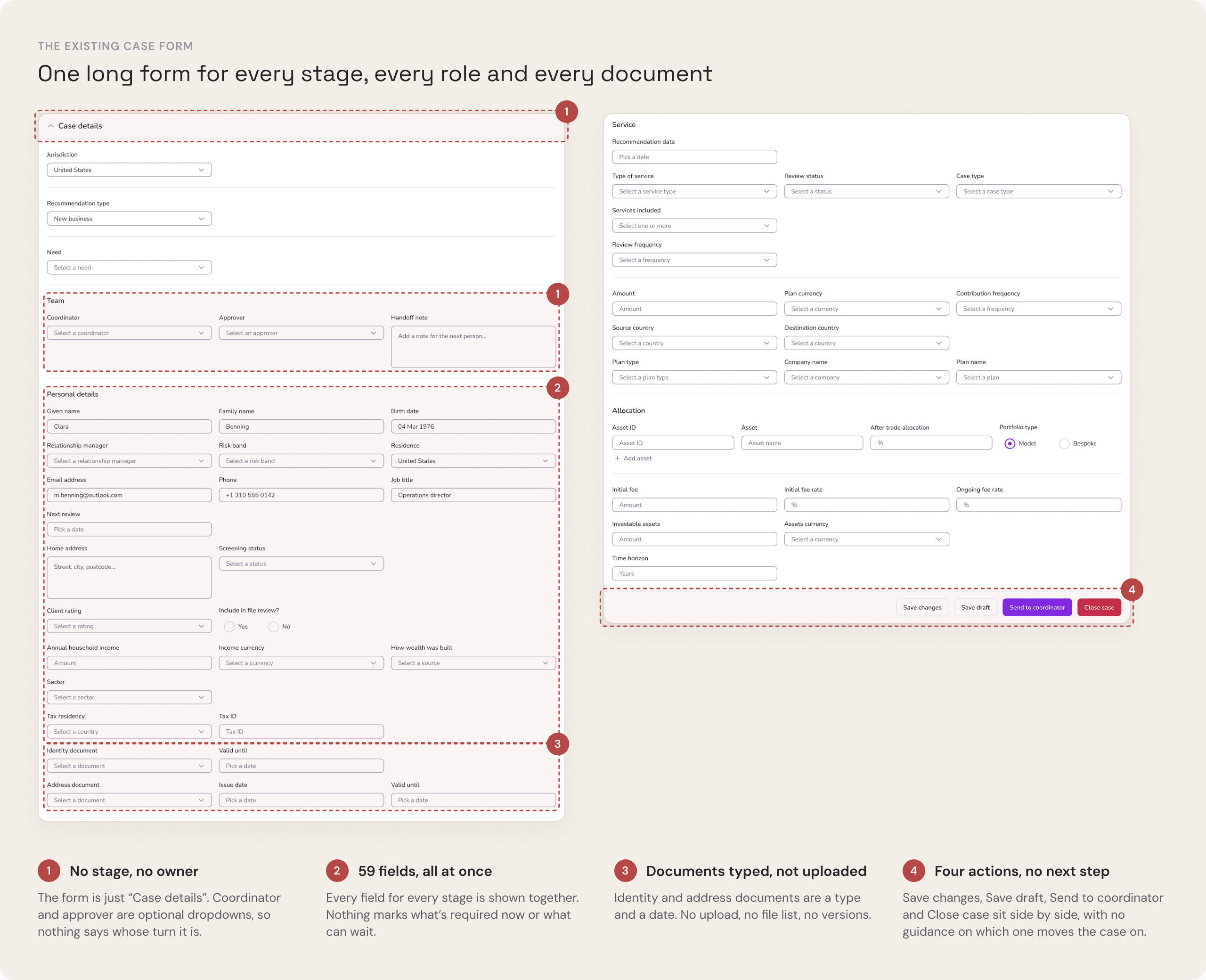
Key limitations included:
Different agency requirements
The workflow needed a shared structure without removing legitimate variations in stages, documents and compliance checks.
Multiple roles
Each stage had a responsible team, with different viewing, editing and approval permissions.
Multiple recommendations
A case could involve several recommendations that shared client information and common documents but required separate product-specific details.
Unclear document status
Users needed to identify required documents and distinguish the current version from earlier copies.
Manual handoffs
A change in status did not reliably communicate ownership, outstanding actions or the need for the next team to act.
Four principles for the redesign
Make ownership visible at the point where people work
Explain what is missing or blocking progress, alongside the next action
Reuse client information and common documents across recommendations
Connect updates and handoffs to changes in the workflow
These principles helped us evaluate the lifecycle, workspace structure and individual interactions against the problems observed during research.
WHY CASES STALLED
Answering four basic questions meant piecing a case together from three places
ONE STATUS CHECK
~20 min
for a drafter to work out where a case stood and what had to happen next, observed during discovery.
SEARCHED ACROSS
CRM queues
SharePoint documents
Conversations with colleagues
THE FOUR QUESTIONS
QUEUES
SHAREPOINT
COLLEAGUES
Where is the case?
A queue status, not the stage
Partly
Not here
Answered
Who has it?
Owner fields often unassigned
Partly
Not here
Answered
What is stopping it from moving?
Only known by asking
Not here
Not here
Answered
Which document is current?
Several versions, no marker
Not here
Partly
Partly
REPEATED SETUP
Clara Benning: three recommendations, three cases set up from scratch
CS-3141 · New business
Meridian Brokerage · IBKR Roth IRA
↻
Personal details and finances
↻
Financial review, risk profile and identity
↻
Proof of identity and address
CS-4214 · Top up
RL360 · PIMS
↻
Personal details and finances
↻
Financial review, risk profile and identity
↻
Proof of identity and address
CS-3171 · Fund switch
Meridian Brokerage · IBKR Roth IRA
↻
Personal details and finances
↻
Financial review, risk profile and identity
↻
Proof of identity and address
The same client details, prerequisites and documents were revisited for every case, even though they belonged to one client.
DIFFERENT JURISDICTION WORKFLOWS
Stages and checks varied by jurisdiction
United Kingdom
Preparation
Coordinator
Drafting
Drafter
Approval
Approver
Client pack
Coordinator
Sign-off
Approver
United States
Preparation
Coordinator
Drafting
Drafter
Approval
Approver
Client pack
Coordinator
Implementation
Coordinator
Sign-off
Approver
The US flow adds an Implementation stage. One rigid process wouldn’t fit; separate experiences per jurisdiction would keep the fragmentation.
WHAT WAS MISSING
A shared working context that connects progress, ownership, outstanding work and the information needed to move forward.
Solution
I designed the case workspace as a dedicated space within the client’s CRM profile.
Rather than treating each recommendation as a disconnected ticket, the case brings together shared client information, prerequisites, individual recommendations, documents, notes and workflow history.
Its current state determines who owns the next step, what is required to proceed and which actions are available to each role.
The central design decision was to make the case itself the shared working context, with the lifecycle connecting everything that happens within it.
What shaped the experience?
Establish a shared lifecycle without ignoring agency differences
I worked with relationship managers, drafters, approvers and coordinators to map how cases moved through their existing processes.
These maps revealed stages common to different agencies, alongside legitimate variations in approvals, document requirements and compliance checks.
My first lifecycle model attempted to represent too many variations as separate paths. It captured the differences but made the overall journey difficult to understand.
I simplified the lifecycle into shared stages and retained agency-specific requirements as conditional rules.
This gave teams a common definition of progress while allowing different cases to follow the checks they required. It also created a consistent foundation for ownership, permissions, documents and notifications.

The new lifecycle created one shared process across agencies, while preserving the specific variations each agency needed at key stages.
Make ownership and blockers part of the case
The original process required users to infer ownership from queues or ask colleagues who was handling a case. Even when they found a status, it often did not explain why the case had stopped moving.
I designed the workspace to present the stage, status, owner and outstanding requirements together.
The actions available to a user follow both their role and the case’s current state. For example, an approver reviewing a case needs different controls from a coordinator responding to an amendment request.
This makes the case useful for completing work rather than simply reporting progress. Users can identify who is responsible, what is missing and what must happen before the next transition.

Organise multiple recommendations around reusable information
We explored extending the existing ticket structure and introducing a dedicated case workspace.
Extending tickets would have required less structural change, but it retained the separation between related recommendations. A dedicated case workspace gave a clearer relationship between the client, the case and each recommendation.
Within the selected structure, common client information and prerequisites belong to the case, while product-specific details belong to individual recommendations. Common documents can be accessed within the same case rather than requested and organised separately for each recommendation.
The trade-off was a larger change to the CRM’s information architecture. It addressed the repeated setup work identified during discovery instead of making that repetition easier to navigate.
Concept 1 · Case inside the client record
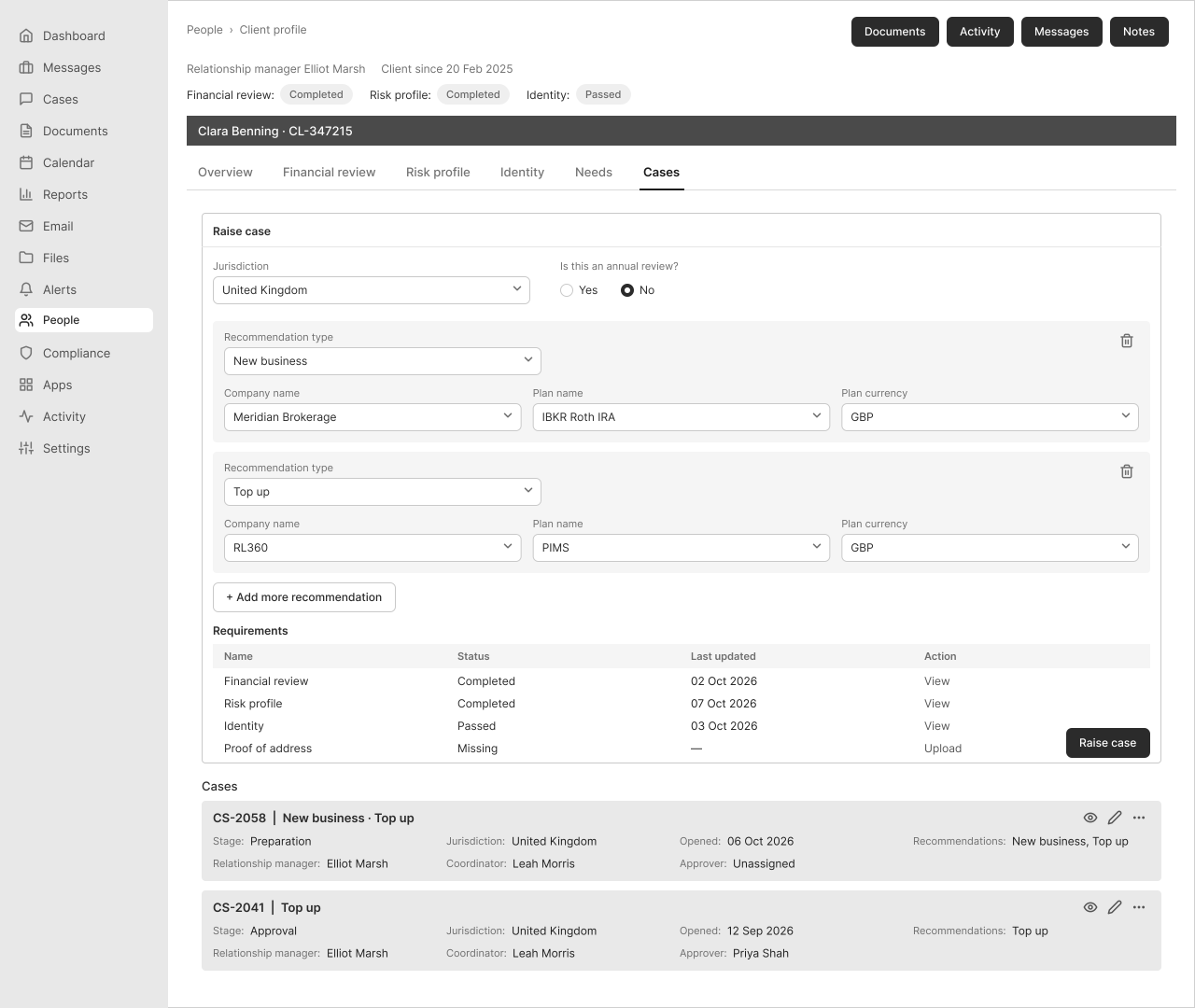
Client record · the case is one tab among the client’s details

Case wizard · every section shown at once, notes under the form
Concept 2 · Dedicated case workspace (designed)
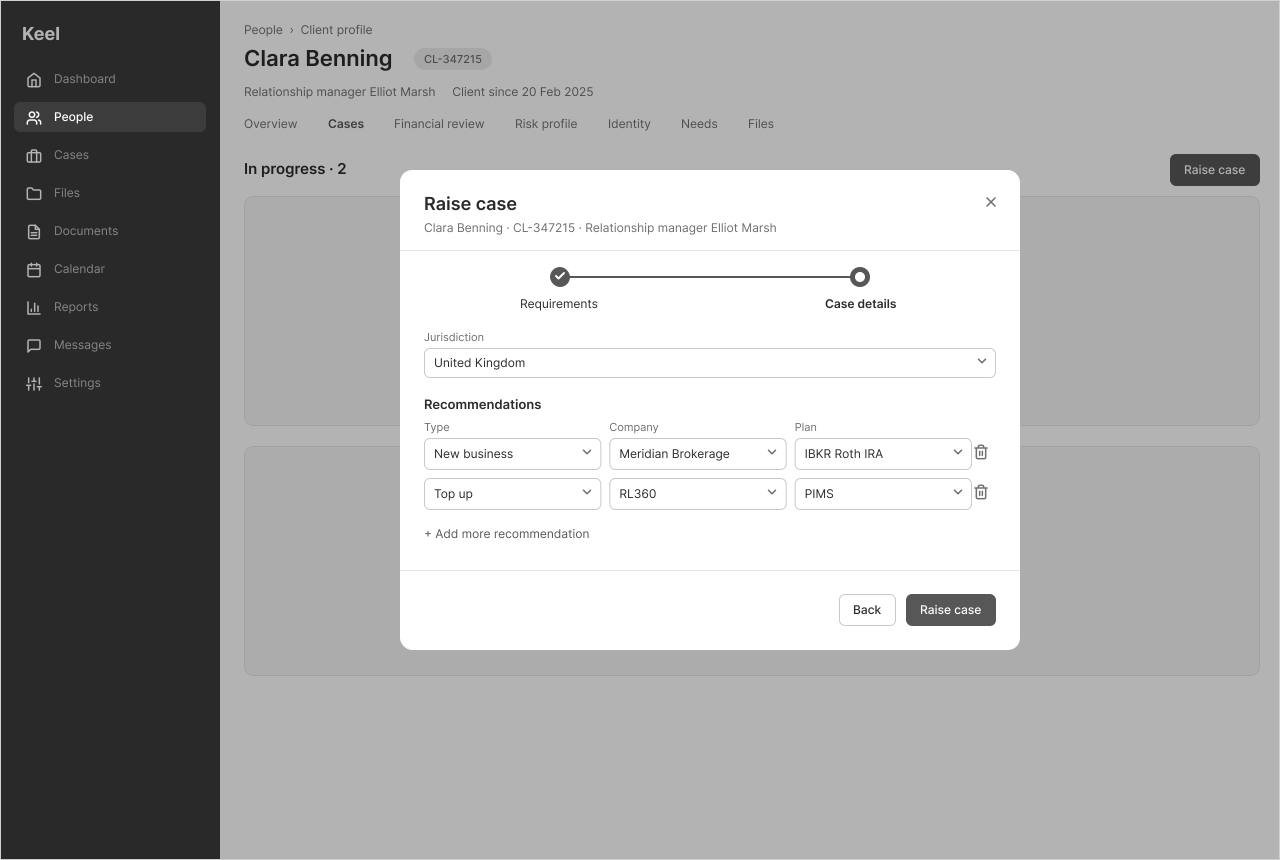
Raise case · requirements checked first, several recommendations in one step
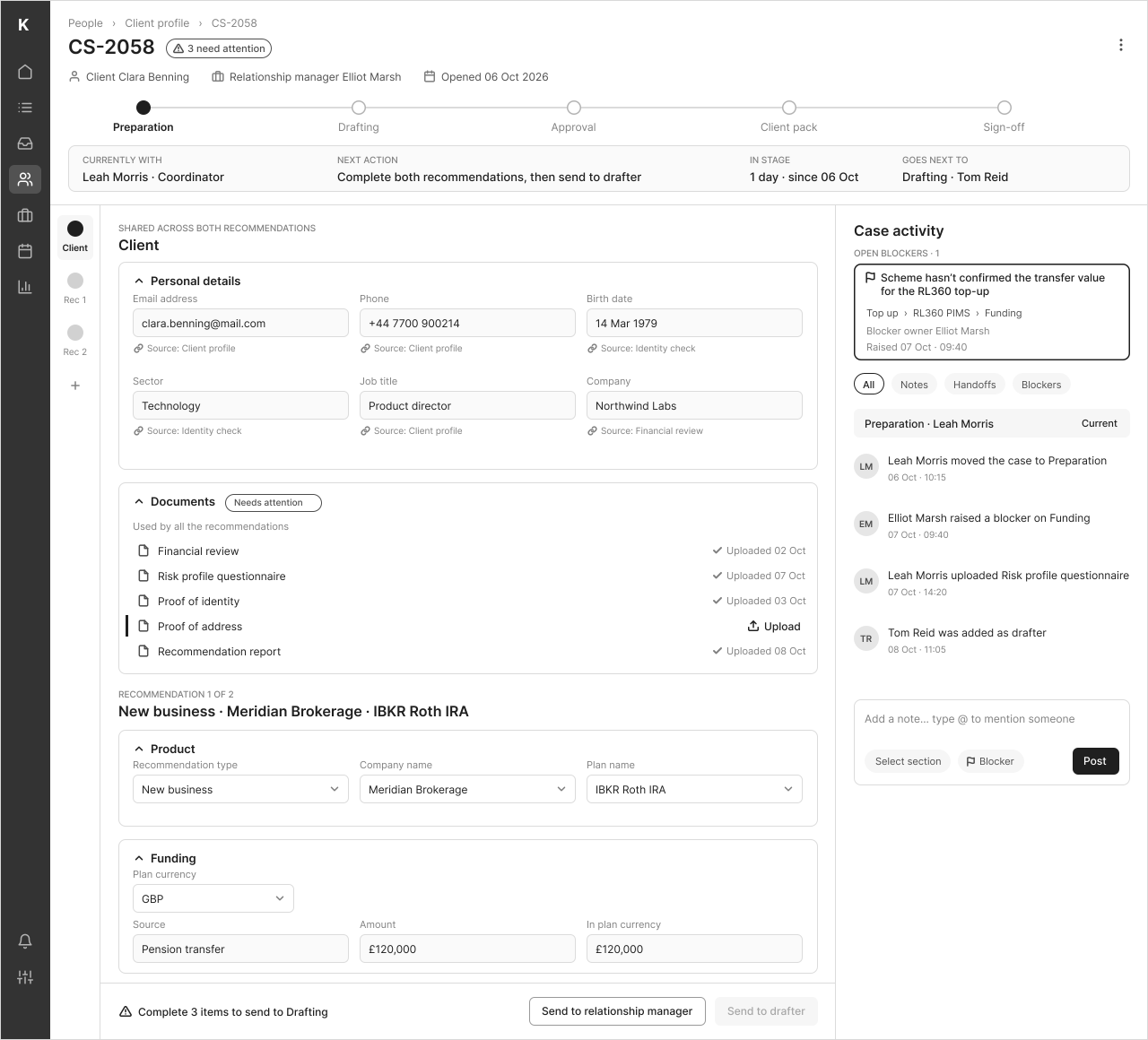
Case workspace · owner and next step up top, activity beside the work
Concept 1
Concept 2
Multiple recommendations
Added as repeated blocks when creating the case
Grouped in a pinned case outline
Form completion
Step-by-step wizard with every section open at once
Short raise modal, then one form with context kept visible
Overall status
A status field on the case card, with no owner or next step
Stage tracker, plus owner and next step in the header
Documents
Checked as prerequisites before raising
Shared across recommendations, missing ones flagged with upload inline
Notes & collaboration
Notes under the form, separate from status
Activity panel beside the work, with blockers pinned
Active vs. historical work
All cases listed together in the client’s Cases tab
Workspace focused on the active case
Best fit
Raising and tracking cases from the profile
Managing a multi-role case end to end
Connect workflow transitions to meaningful handoffs
Previously, changing a status and telling the next person to act were often separate activities.
We connected lifecycle transitions to the responsible role, available actions and relevant notifications. When a case is assigned, returned for amendments or approved for the next stage, the new owner receives the context needed to continue.
The implementation included 54 notification touchpoints. Their purpose was not to increase the volume of messages, but to reduce the need for people to manually identify and contact the next owner.
The workflow now communicates responsibility as part of a state change rather than leaving the handoff to an informal conversation.

Each notification is triggered by one role’s action and sent to the role that needs to act next.
How was the workflow validated before launch?
The experience needed to work across several agencies, multiple user roles and different case types. Testing one successful relationship-manager journey would not reveal what happened when a case changed owners, required amendments or followed an agency-specific compliance route.
I involved relationship managers, drafters, approvers and coordinators during discovery, concept reviews and prototype validation. Their feedback helped shape the lifecycle, terminology, workspace structure and information required at each handoff.
During implementation, I worked with engineering and QA to check different combinations of agency, role, case type, lifecycle state, document permissions and notification triggers.
Approximately 30 users across relevant roles participated in validation, helping identify issues that could arise when a case moved from one team to another.
The focus was not only whether each screen worked. It was whether the complete case remained understandable and actionable as responsibility changed.
CASE WORKSPACE · VALIDATION EVIDENCE
Testing the workflow across roles and states
Prototype feedback exposed problems that only appeared as a case moved between teams, responsibilities and lifecycle stages.
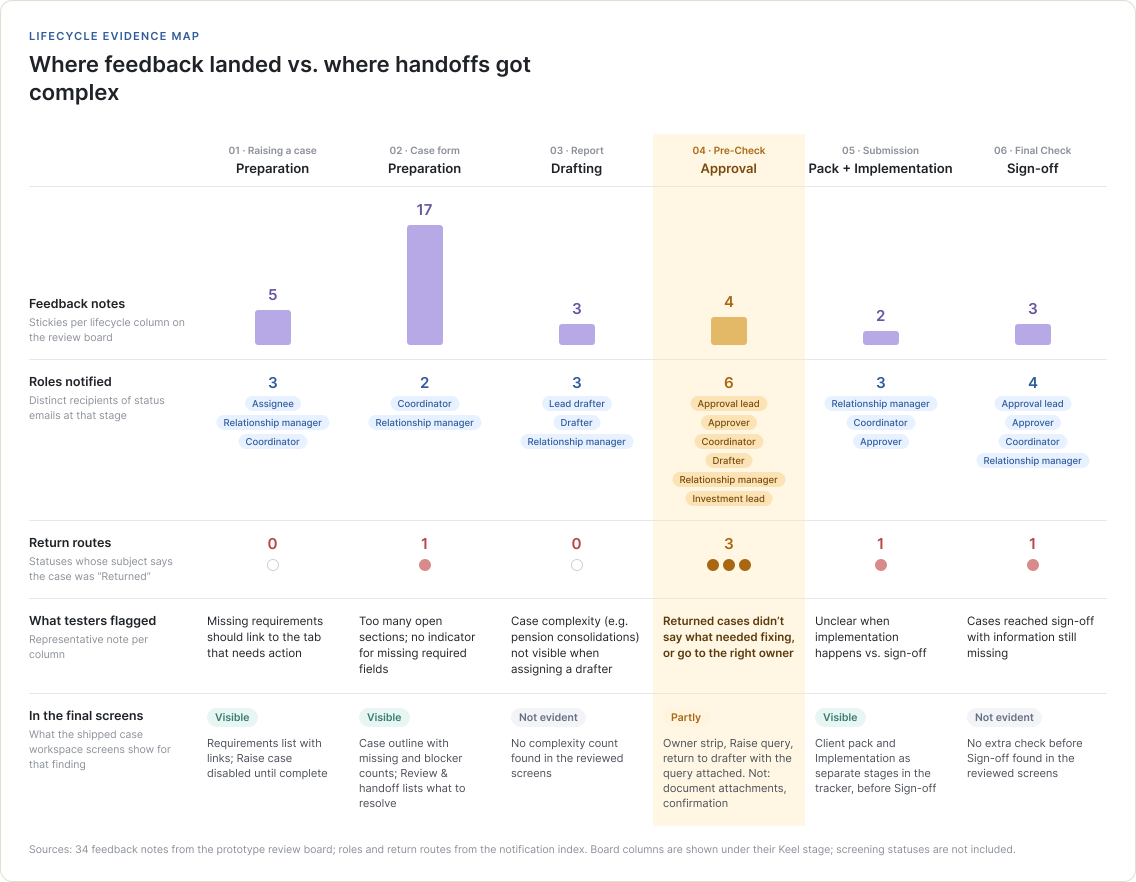
A returned case needed to explain more than its status.
It needed to show what was wrong, who now owned it and what had to happen next. Left: what testers said. Right: what the final screens show.
FINDING
When an approver returns a case, it isn’t clear what needs fixing.
RELATED NOTES
Ability to send cases back to the relationship manager, not only the coordinator, so responsibility stays with them
Allow approvers to attach updated forms and documents when returning a case to the coordinator
Coordinator confirmation on resubmission: coordinators confirm what they’ve addressed before sending it back
STILL OPEN
Attaching documents to a return and confirming what was addressed are not evident in the final screens.
IN THE FINAL SCREENS
Owner + state: Approval · with the approver.
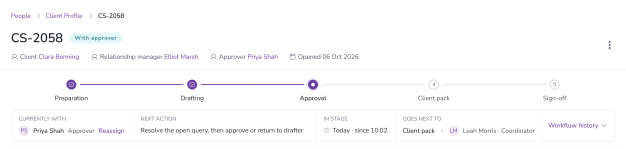
Route to the right owner: the current owner, next action and next owner sit beside the stage tracker.

FEEDBACK STAYS WITH THE CASE
Notes grouped by stage and tagged with the sender’s role.
NAMED NEXT OWNER
“Case returned by approver” goes to the drafter or coordinator.
RESUBMIT, NOT RESTART
“Amendments resubmitted for review” returns it to the approver.
QA SCENARIOS
Each test targets a handoff, not a screen.
01 · PREPARATION
Missing requirement
EXPECTED
Creation is blocked and the missing requirement is clearly identified.
VALIDATES
Can the user see why they can’t proceed and reach the requirement?
02 · APPROVAL
Approver returns the case
EXPECTED
The drafter receives it with the open query and the corrections clearly visible.
VALIDATES
Are blockers, documents and next action preserved through the handoff?
03 · DRAFTING → APPROVAL
Resubmission
EXPECTED
The drafter confirms what was addressed before sending it back to the approver.
VALIDATES
Does the workflow keep context rather than restart the case?
04 · SIGN-OFF
Sign-off
EXPECTED
Required information is complete before the case reaches sign-off.
VALIDATES
Can missing information still slip through earlier stages?
Prototype feedback
→
Role / state QA
→
Scenario testing
→
Design changes
The most important issues appeared between stages and roles, not inside a single screen.
What did the first release deliver?
The redesigned experience brought the following connected capabilities into one workspace:
A shared lifecycle and working context
Users can see where a case stands, who currently owns it and which actions are available, without reconstructing progress across several systems.
Multiple recommendations within one case
A case can contain several recommendations while sharing relevant client information, prerequisites and case-level documents. Product-specific details remain associated with the correct recommendation.
Documents and notes alongside the work
Mandatory and additional documents are organised by whether they apply to the overall case or an individual recommendation. Document actions follow the case’s stage and the user’s permissions, while version information helps users identify the current document. Notes retain requests and context within the case.
Connected prerequisites
Relevant Fact Find, eKYC, ATRQ and IDD information is accessible within the case so users can identify incomplete requirements before attempting to progress the case.
Role-based actions and notifications
Changes in lifecycle state determine the next owner, permitted actions and relevant handoffs.
Together, these capabilities make it possible to understand and progress a case from one workspace rather than repeatedly assembling its current state from different sources.
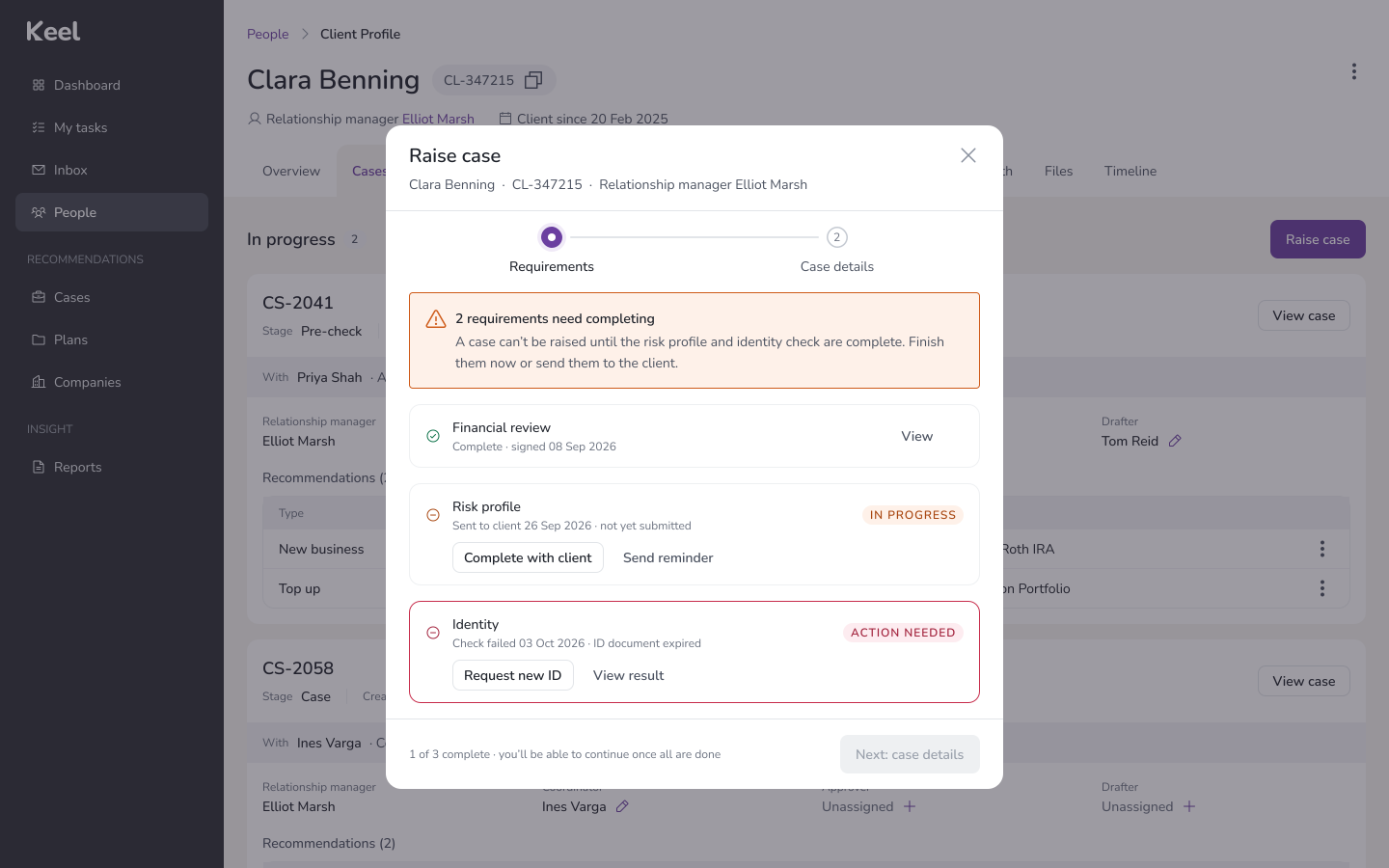
01
Connected requirements
Financial review, risk profile and identity are checked before the case can be raised. Anything missing is named, with who to chase and what to do, instead of being discovered later in the workflow.
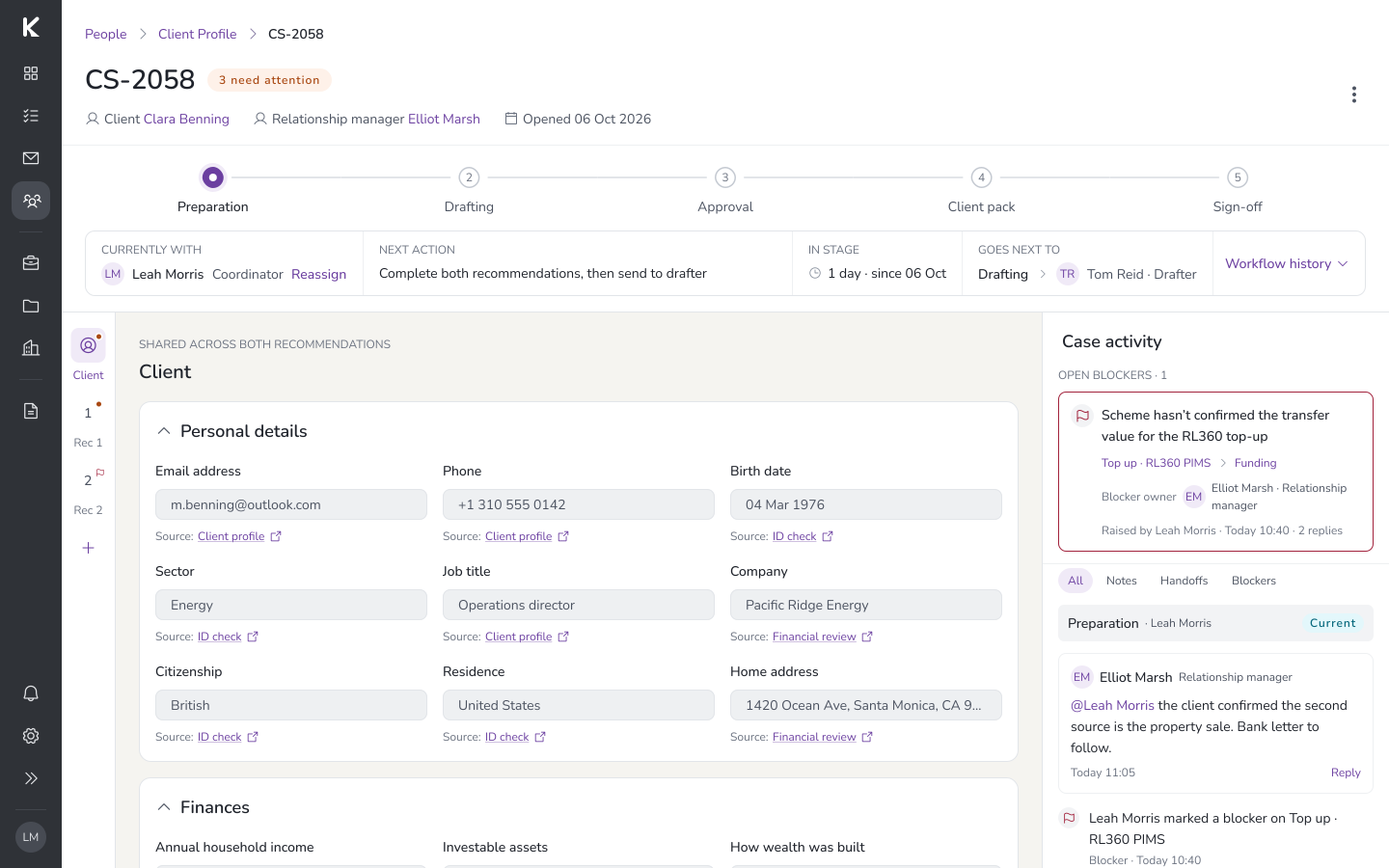
02
One place to understand the case
The case header puts the stage, current owner, next action and who it goes to next in one place, so no one reconstructs progress across queues or conversations.
RECOMMENDATION 1 · NEW BUSINESS · MERIDIAN BROKERAGE

RECOMMENDATION 2 · TOP UP · RL360
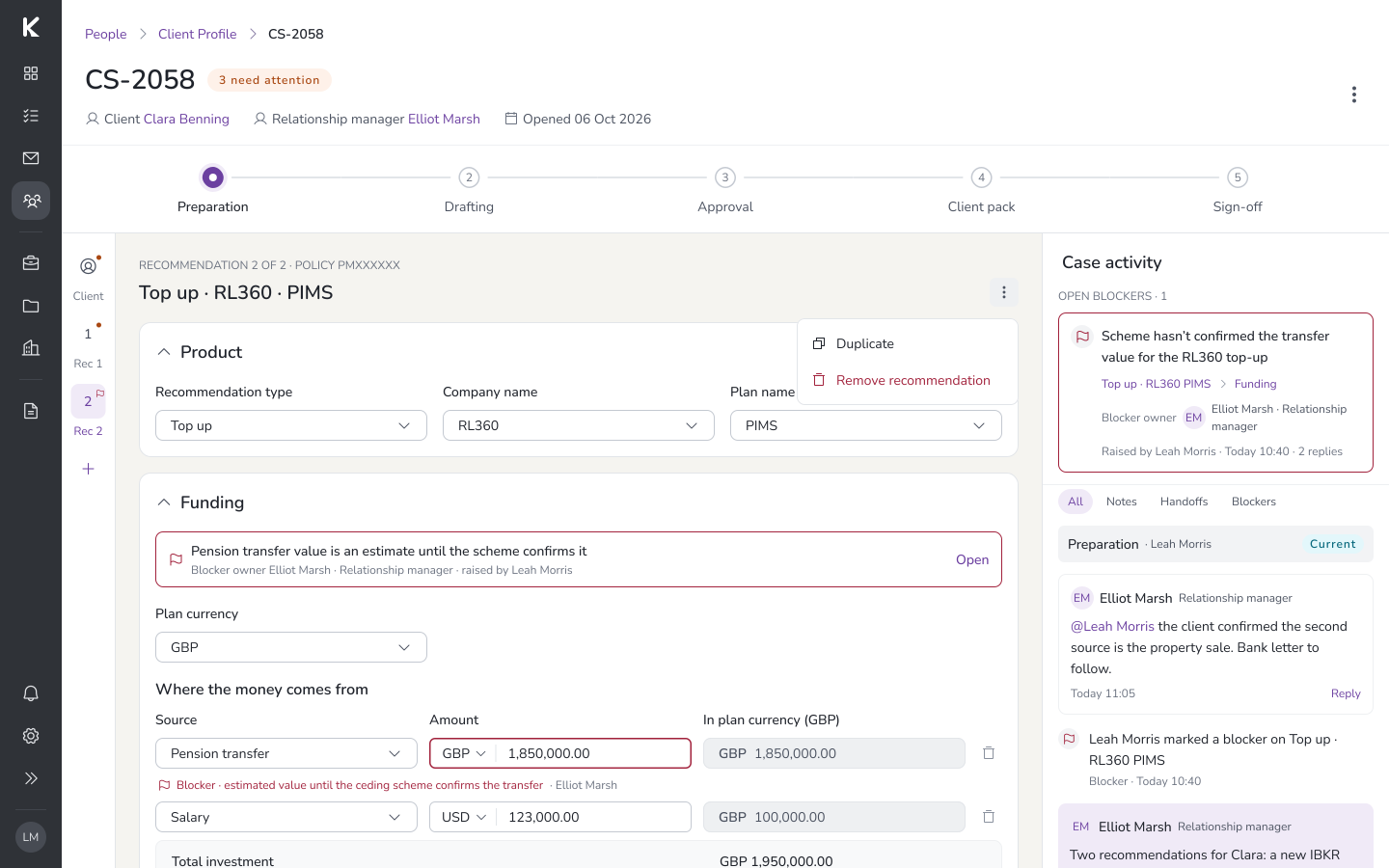
03
One case, multiple recommendations
Client information and shared documents are captured once for the case. Each recommendation, here a New business and a Top up, keeps its own product, funding and documents.
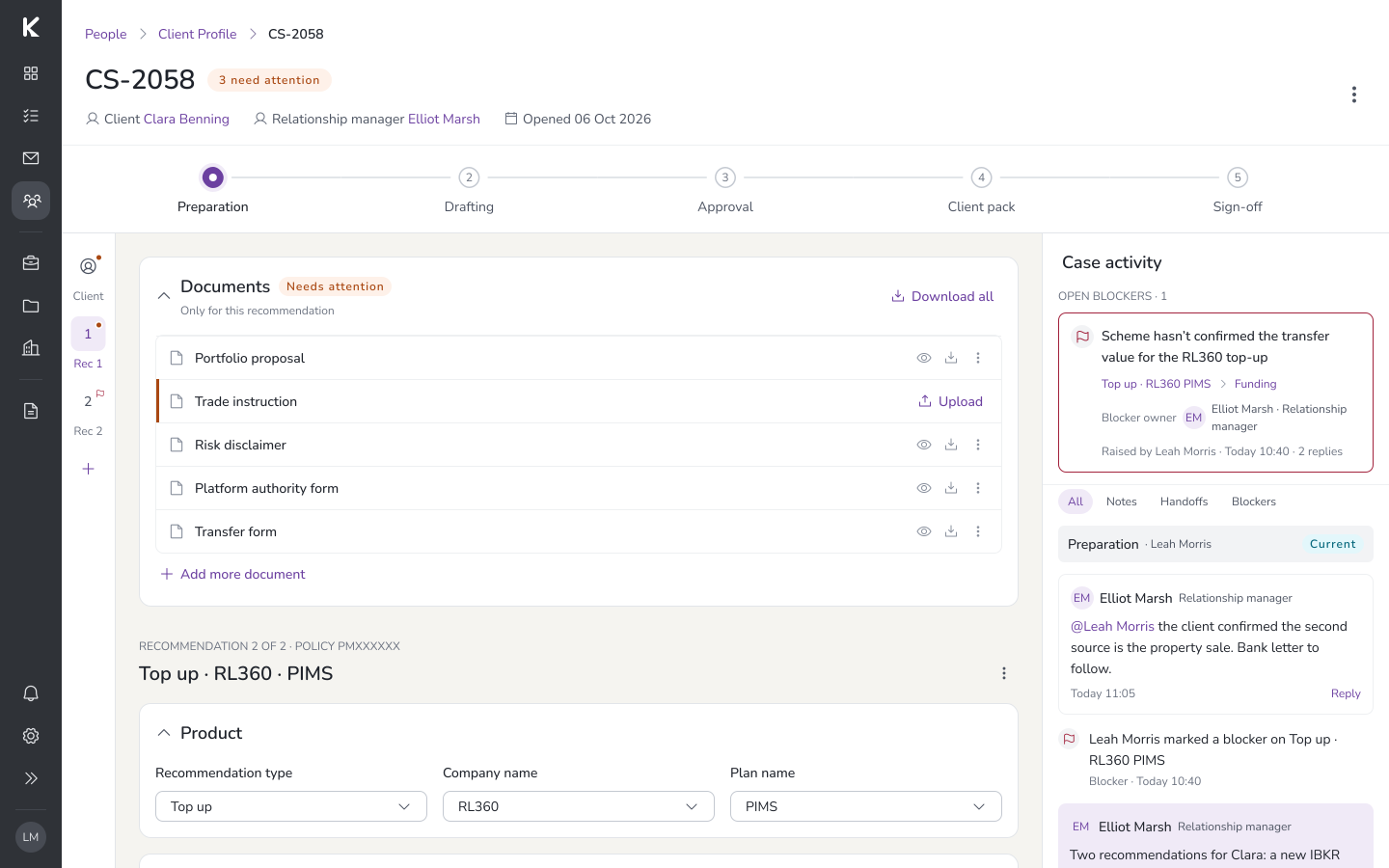
04
Evidence stays with the case
Shared documents sit with the case and are reused by every recommendation. Missing items are flagged with an inline upload, so no one searches other tools for the current evidence.
AT APPROVAL · PRIYA SHAH, APPROVER

ONLY THE APPROVER SEES · RETURN TO DRAFTER · APPROVE
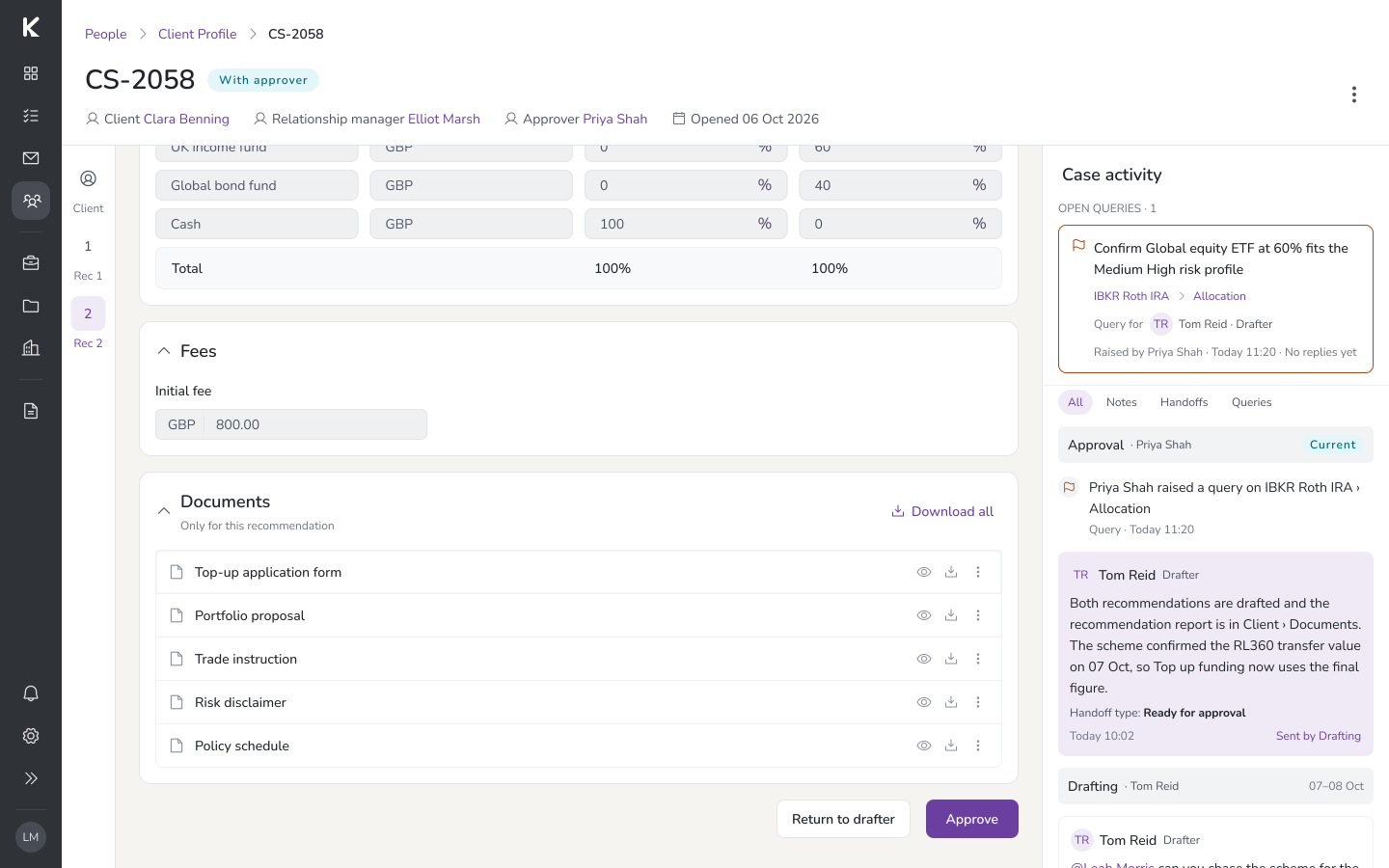
05
Actions follow the stage and role
At Approval, the approver gets the actions to review, raise a query, return to the drafter or approve. Others keep visibility without actions that don’t belong to their role.

06
The next owner inherits the context
When the case moves between roles, open queries, outstanding requirements and documents travel with it. The header shows who has it now and who it goes to next.
Impact
The shared workspace connected case progress, ownership, outstanding requirements, documents and next actions within one experience.
A clearer workflow at the scale of 1,800 cases a month
5 → 2 days
cycle time, ~60% faster
~1,800/mo
cases processed
~30
users validated across roles
54
notification touchpoints, designed
Single source of truth for documents · hard-block on true duplicates · real-time status for every role.
The redesign addressed the questions that repeatedly surfaced during discovery. Users could establish where a case was, who owned it, what was blocking progress and which document was current within the case itself.
Rather than making teams more efficient at chasing updates, the redesign reduced the need to chase them in the first place.
How I worked
With
Relationship managers, drafters, approvers and engineering
I worked with relationship managers, drafters, investment teams, approvers, coordinators and product stakeholders across multiple agencies. Their involvement helped establish the shared lifecycle and validate the experience from different roles. I collaborated with engineering and QA to implement and test state-driven behaviour, permissions, document rules and notifications.
ARTEFACTS
Research, workflow models and validation
My work included interview synthesis, current-state maps, the initial and simplified lifecycle models, information architecture, Figma concept comparisons, interactive prototypes, role-permission matrices, document-action rules, notification logic and QA scenarios. These artefacts helped teams agree on how the process should operate before and during implementation.
AI AS ASSISTANT
Faster synthesis, exploration and feedback
I used AI-assisted prototyping to explore workflow and layout concepts quickly and make alternative directions easier to discuss with the product and design teams. These prototypes supported exploration; the final decisions were informed by operational requirements, stakeholder feedback and user validation.
What I learned
A shared state model can solve several problems at once
I initially approached the lifecycle as a way to communicate progress. It became the foundation for ownership, blockers, permissions, document actions and notifications. Defining state clearly made the wider experience more consistent.
Shared workflows still need room for legitimate differences
My first lifecycle attempted to represent too many agency variations explicitly. Simplifying the common stages while retaining conditional rules made the process easier to understand without removing necessary checks.
Status is only useful when it helps someone act
Displaying “In progress” does not answer who has the case or why it cannot move. Connecting status to ownership, outstanding requirements and the next action makes progress information useful in day-to-day work.
Reuse depends on getting the information model right
Putting multiple recommendations on one page would not have removed repeated setup work by itself. We needed a clear distinction between information shared by the case and details that belonged to an individual recommendation.
What’s next
The redesigned workspace makes a case’s current state and responsible owner visible. The next opportunity is to use that information to identify potential delays before someone has to investigate them.
Future improvements could highlight cases approaching an SLA, surface unresolved blockers and provide more specific reminders to the responsible owner. Further workflow-configuration work could also help the business accommodate changing agency requirements without creating disconnected processes again.
These are future opportunities rather than capabilities included in the delivered redesign.
More case studies